OUR LEARNINGS EMPOWERMENT TECHNOLOGY
3RD QUARTER- FINAL PROJECT
SUBMITTED BY:
ANSARIH S. MANGOTARA 11-T3-KILBY
MARY JOY Q. BUGAY
NORMINA L. BAO
SUBMITTED TO:
MS. THERESE MARIE P. ARONG
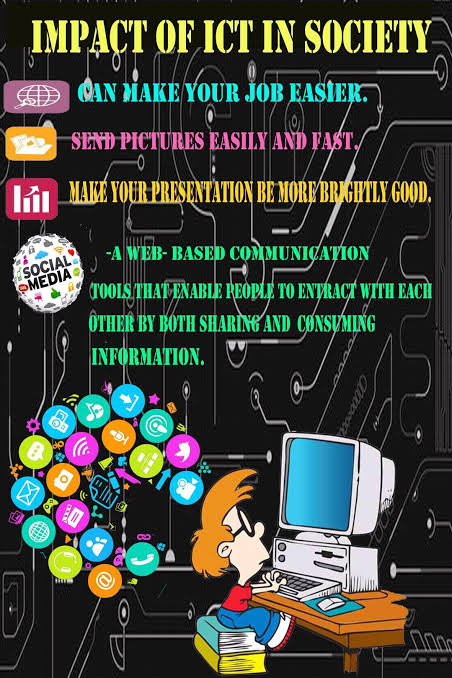
ICT- is also used to refer to the convergence of audiovisuals and telephone networks with computer networks through a single cabling or link system. There are large economic incentives to merge the telephone networks with the computer network system using a single unified system of cabling, signal distribution, and management. ICT is an umbrella term that includes any communication device, encompassing radio, television, cell phones, computer and network hardware, satellite systems and so on, as well as the various services and appliances with them such as video conferencing and distance learning. ICT also includes analog technology, such as paper communication, and any mode that transmits communication.
•INTERNET– The Internet is a global network of billions of computers and other electronic devices. With the Internet, it’s possible to access almost any information, communicate with anyone else in the world, and do much more. You can do all of this by connecting a computer to the Internet, which is also called going online.

• WORLD WIDE WEB •The world wide web opened up the internet to everyone, not just scientists. It connected the world in a way that made it much easier for people to get information, share, and communicate. It has since allowed people to share their work and thoughts through social networking sites, blogs, video sharing, and more.
• TYPES OF WEB PAGES •WEB 1.0- is the term used to describe the earliest form of the internet. •WEB 2.0- are websites and applications that make use of user-generated content for end users. •WEB 3.0- describes the next evolution of the World Wide Web, the user interface that provides access to documents, applications and multimedia on the internet.
• DIFFERENT TYPES OF PLATFORM PRESENTATION PLATFORM-Some of the best presentation software include Visme, Haiku Deck, Prezi, Microsoft Powerpoint, Canva and Google Slides MAPPING PLATFORM- perform spatial calculation in the background and offer flexibility as to how the results are displayed in combinations of maps, tables, charts and graphs, or text. SOCIAL MEDIA PLATFORM-allow users to have conversations, share information and create web content.
MODULE 2.1: ONLINE SAFETY, SECURITY, ETHICS, AND ETIQUETTE: INTERNET THREATS. ONLINE SAFTEY– is trying to be safe on the internet and is the act of maximizing a user’s awareness of personal safety and security risks to private information and property associated with using the internet, and the self-protection from computer crime. MALWARE-Malware, or malicious software, is any program or file that is intentionally harmful to a computer, network or server. Types of malware include computer viruses, worms, Trojan horses, ransomware and spyware. SPAM– is any unsolicited communication sent in bulk. Usually sent via email, spam is also distributed through text messages (SMS), social media, or phone calls. Spam messages often come in the form of harmless (though annoying) promotional emails. But sometimes spam is a fraudulent or malicious scam. PHISHING is a scam where thieves attempt to steal personal or financial account information by sending deceptive electronic messages that trick unsuspecting consumers into disclosing personal information.
MODULE 2.2: ONLINE SAFETY, SECURITY, ETHICS, AND ETIQUETTE: NETIQUETTE AND INTELLECTUAL PROPERTY
SOFTWARE INTELLECTUAL PROPERTY- Software intellectual property, also known as software IP, is a computer code or program that is protected by law against copying, theft, or other use that is not permitted by the owner. Software IP belongs to the company that either created or purchased the rights to that code or software. COPYRIGHT- is a type of intellectual property that gives its owner the exclusive right to copy, distribute, adapt, display, and perform a creative work, usually for a limited time. The creative work may be in a literary, artistic, educational, or musical form. PATENT- is an exclusive right granted for an invention, which is a product or a process that provides, in general, a new way of doing something, or offers a new technical solution to a problem
MODULE 3: PRODUCTIVITY TOOLS
Productivity tools it help users produce things such as documents, databases, graphs, spreadsheets and presentations. It increases efficiency by facilitating people’s tasks.
EXAMPLES 1. MS WORD

2. MS POWERPOINT

3. MS EXCEL

A Mail Merge is a word processing feature that allows you to easily create multiple
letters, labels, envelopes, nametags, or catalogue documents to group of people
as stored in a list in a database or spreadsheet.
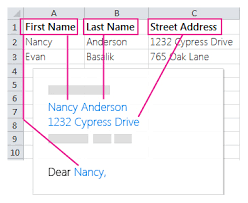
Three Main Components of Mail Merge:. Main document – the letter which contain the email information for each of the
merged document that can be letter, stationary or template. Data source – it is also called data file which comprises the information to bemerged into a document such as the list of names and addresses to be used in a mail merge. Merge document – this is also a word processing document that is the generated
output after executing the merge process.
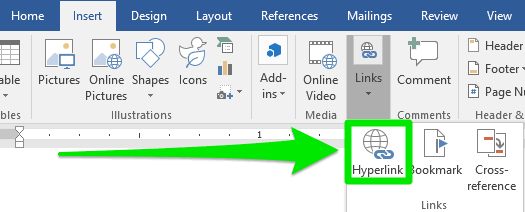
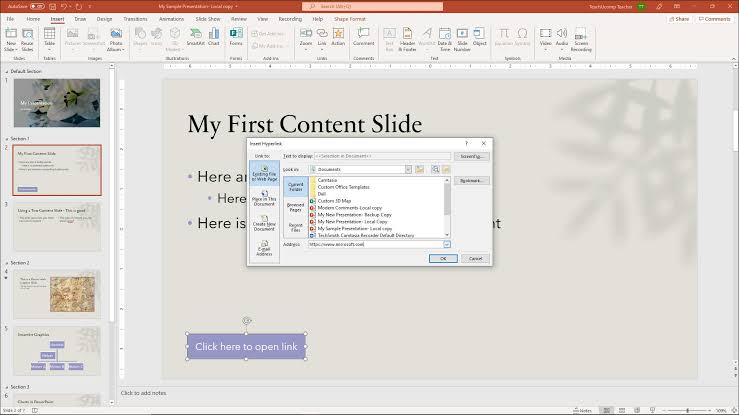
A Hyperlink is a link that will direct you to another page or part of the same
document. Hyperlinks can be a word, a phrase, a symbol or image, a different
element in a document, another hypertext document, a file, or a script.
HYPERLINK IN MS WORD
HYPERLINK IN MS POWERPOINT
•ADVANCE TECHNIQUES IN EXCEL
•Relative Reference– Data changes based on the relative position of rows and columns.
•Absolute Reference– Data does not change when copied or filled. Inserting $ sign in between or before the row and column.
MODULE 4: ONLINE PLATFORMS FOR ICT CONTENT DEVELOPMENT
Basic Principles of Graphics and Layout. BALANCE- deals with the visual weight of objects, texture, colors, and
space
EMPHASIS– the area designed to attract the viewer’s attention
MOVEMENT– guides the viewer’s eye around the screen
PATTERN, REPETITION, RHYTHM– achieved when visual elements create a sense of organized movement.
PROPORTION– visual elements that create a sense of unity where they relate well with one another
VARIETY– uses several design elements to draw a viewer’s attention. INFOGRAPHICS – Information graphics or infographics are used to represent information,
statistical data, or knowledge in a graphical manner usually done in a creative way
to attract the viewer’s attention.
EXAMPLE OF INFOGRAPHICS:
MODULE 5: THE PRINCIPLES AND TECHNIQUES OF DESIGN
other applications, processes or technologies are developed and it is a set of
standards that enables software developers to develop a software application
for the platform.
TYPES OF ONLINE PLATFORMS. Social Media– these are compute-mediated tools that allow people, companies and other organizations to create, share, or exchange information, career interests, ideas, and pictures/video in virtual communities and networks .
Blogging– which focuses on the content and design. It typically looks like a newsletter where you are given options to change to your liking.
Ex. WordPress, tumblr and blogger
Presentation/Visualizations– is also part of the example, its primary goals is to communicate information clearly and efficiently via statistical graphics, plots and information graphics. Ex. Prezi, Zoho,
Slideshare and Mindmeister
Cloud Computing– is the practice of using network of remote servers hosted on the internet to store, manage process data, rather than a local server or a personal computer. Ex. Google Drive and DropBox
Web Page Creation– is a platform that encompasses a number of
important elements including color, layout and overall graphical appearance
Ex. Wix and Weebly
Files Management– is the storing naming, sorting and handling of computer files. Ex. Zamar and word2pdf
Mapping– is an online platform which shows a transformation taking the points of one space in to the points of the same or another space.
Ex. Google maps and Ikiamapia
MODULE 6: EMAIL MANAGEMENT USING GMAIL
•GETTING TO KNOW EMAIL Email (electronic mail) is a way to send and receive messages across the Internet. It’s similar to traditional mail, but it also has some key differences.
UNDERSTANDING EMAIL ADDRESSES– To receive emails, you will need an email account and an email address. Also, if you want to send emails to other people, you will need to obtain their email addresses.
MODULE 7: COLLABORATIVE ICT DEVELOPMENT
- Online Collaboration Technology– Through the use of collaboration software, online collaboration technology enables a team of people to work together virtually to accomplish a common goal. Web conferencing allows for virtual meetings of the group to exchange ideas, which helps to maximize online cooperation.
- Web Portal– is a website that compiles data from several sources and presents it all in one spot uniformly.
- Collaborative Tools– A group can converse online by using one of the many collaborative tools available. Online collaboration tools include Facebook groups, WordPress, Google Drive, Microsoft Office Online, Yammer, and Trello.
Web Designs are evaluated according to:
- Accuracy – If your page includes information about the author, the organization that published the page, and a way to get in touch with them.
- Authority– If your page includes the author’s credentials and has one of the following preferable domains:(.edu,.gov,.org, or.net)
- Objectivity– If your website presents the facts objectively, with little advertising, and with accuracy.
- Currency– If your page is up to date, as indicated on the page, and if any links are there, they are also up to date.
- Coverage– If you are able to fully read the content without paying any fees or using a certain type of browser or software
of collaboration software, online collaboration technology enables a team of people to work together virtually to accomplish a common goal. Web conferencing allows for virtual meetings of the group to exchange ideas, which helps to maximize online cooperation.
Web Portal– is a website that compiles data from several sources and presents it all in one spot uniformly.
Collaborative Tools– A group can converse online by using one of the many collaborative tools available. Online collaboration tools include Facebook groups, WordPress, Google Drive, Microsoft Office Online, Yammer, and Trello.
Web Designs are evaluated according to:
Accuracy – If your page includes information about the author, the organization that published the page, and a way to get in touch with them.
Authority– If your page includes the author’s credentials and has one of the following preferable domains:(.edu,.gov,.org, or.net)
Objectivity– If your website presents the facts objectively, with little advertising, and with accuracy.
Currency– If your page is up to date, as indicated on the page, and if any links are there, they are also up to date.
Coverage– If you are able to fully read the content without paying any fees or using a certain type of browser or software
MODULE 8: Collaborative Development in ICT
Newsletter– is a periodical that is issued on a regular basis and typically covers a key subject of interest to its readers. Newspapers and pamphlets are examples of a sort of newsletter, however in the modern world, a newsletter may be hosted on a variety of internet platforms, including the ones listed below:
•Presentation / Visualization (e.g. Prezi, Mindmeister)
Cloud Computing (e.g. Google Drive, •Dropbox)
•Social Media (e.g. Facebook Pages, Tumblr)
•Web Page (e.g. Wix, Weebly)
•Blog Sites (e.g. Blogger, WordPress) The creation of ICT content can be done using a variety of collaborative methods. Online collaborative tools enable team managers, authors, editors, and designers to work together in real time. Online collaboration is supported by collaborative tools. The content is typically backed up online in these “cloud” applications, which are typically standalone programs. To use these programs, you must be connected to the internet. Once the internet is connected, you can sync up if you are currently offline. Basic examples of collaborative tools are: 1. Voicemail
2. Video Call
3. E-mail
4. Instant Messaging
5. Trello
6. Yammer
7. Podio
8. Portal. Social Chat: 1. Google Chats
2. Google Hangouts
3. Skype
4. Viber
5. KakaoTalk
6. WeChat
7. Line Social Media: 1. Facebook
2. Blog
3. Microblog. Cloud – Based Collaborative Tools: 1.Google Drive
2.Zoho
3.Prezi
4.Microsoft Office Online
5.Adobe Creative Cloud Project Management for ICT Content: Content Management Systems– A computer program called a content management system (CMS) lets you create, edit, manage, organize, and delete web material. Blogs, news websites, and e-commerce sites all use CMS. WordPress, a free content management system, is an example of a CMS PHP and MySQL-based administration system.
 Site Title